
To reset the oil life on a 2015–2020 Ford F-150, turn the ignition on (engine off) and use the left steering wheel buttons to go to Settings > Advanced Settings > Vehicle > Oil Life Reset, then hold OK until it shows 100%. On 2021 and newer trucks the path is Menu > Settings > Vehicle Maintenance > Oil Life. Older trucks use the dash buttons or the knob on the cluster. Steps for every generation are below.
This guide is part of our Ford F-150 Owner’s Guide, with every key spec and common fix in one place.
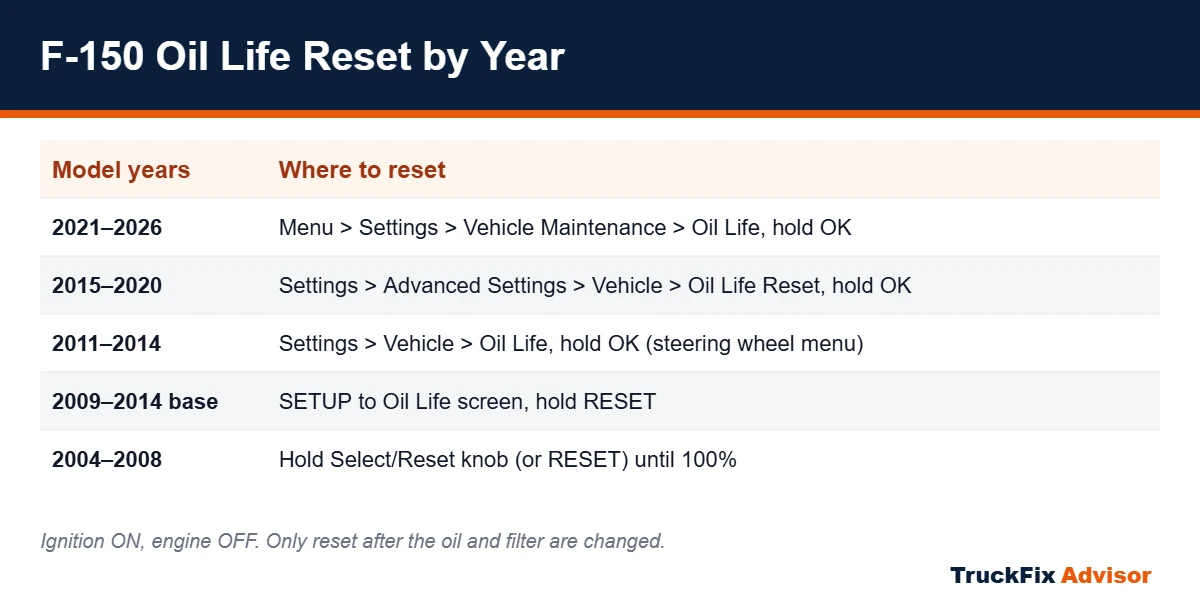
F-150 Oil Life Reset by Year (Quick Chart)
| Model years | Controls | Where to find the reset |
|---|---|---|
| 2021–2026 | Left steering wheel arrows + OK | Menu > Settings > Vehicle Maintenance > Oil Life, hold OK |
| 2015–2020 | Left steering wheel 5-way pad | Settings > Advanced Settings > Vehicle > Oil Life Reset, hold OK |
| 2011–2014 (with steering wheel menu) | Left steering wheel pad | Settings > Vehicle > Oil Life, hold OK |
| 2009–2014 (base dash buttons) | SETUP and RESET buttons | Press SETUP to Oil Life screen, hold RESET |
| 2004–2008 | Select/Reset knob on the cluster, or SETUP/RESET buttons | Oil Life screen, hold the knob or RESET until 100% |
Menu names can differ slightly by trim and software, for example “Vehicle Maintenance” or “Convenience.” Look for “Oil Life” in the Settings or Vehicle menu.
2021–2026 F-150 (Digital Cluster)
- Turn the ignition on without starting the engine. On push-button trucks, press START without pressing the brake.
- Use the left steering wheel arrows to open the Menu.
- Go to Settings > Vehicle Maintenance > Oil Life.
- Press and hold OK until the display confirms the reset and shows 100%.
- Turn the ignition off and start the truck to check the new value.
The oil life reset is in the instrument cluster, not on the SYNC touchscreen. Guides that mention resetting SYNC are about restarting the infotainment system.
2015–2020 F-150
- Turn the ignition on with the engine off.
- Use the 5-way pad on the left side of the steering wheel to select Settings.
- Go to Advanced Settings > Vehicle > Oil Life Reset.
- Press and hold OK for about 3 seconds until it shows 100% or “Reset Successful.”
- Press the back arrow to exit and turn the ignition off.
2009–2014 F-150
Trucks with the steering wheel menu
- Ignition on, engine off.
- Use the left steering wheel pad to go to Settings > Vehicle > Oil Life.
- Hold OK until the oil life shows 100%.
Trucks with dash buttons
- Ignition on, engine off.
- Press and release SETUP until the display shows the Oil Life screen.
- Press and hold RESET for about 2 seconds until it shows 100%.
2004–2008 F-150
Trucks with the knob on the instrument cluster
- Turn the key to ON with the engine off.
- Press and hold the Select/Reset knob on the cluster until the oil life screen appears (“OIL LIFE XX% HOLD RESET = NEW”).
- Press and hold the knob again for about 2 seconds and release when it shows 100%. If you hold too long it may cycle past 100%, so keep holding until it returns to 100%.
- Turn the key off and restart to confirm.
Trucks with INFO / SETUP / RESET buttons
- Key ON, engine off.
- Press SETUP until you see “OIL LIFE = XX% HOLD RESET = NEW.”
- Hold RESET for about 2 seconds until it shows 100%.
How the Intelligent Oil Life Monitor Works
Ford’s Intelligent Oil-Life Monitor does not test the oil itself. It calculates oil life from how the truck is used: engine temperature, cold starts, idle time, towing, driving style and time since the last oil change. That is why two trucks can need oil changes at very different mileages.
- “Change Engine Oil Soon” appears when about 5% oil life is left.
- “Oil Change Required” appears at 0%.
- Under light driving the interval is often 7,500 to 10,000 miles. Heavy towing, dusty roads or lots of short trips can bring it down to about 5,000 miles.
- Ford recommends changing the oil at least once a year, even if the monitor still shows oil life left.
Why the Oil Life Will Not Reset
- The engine is running. Reset with the ignition on and the engine off.
- You are on the wrong screen. The trip or engine information screen only displays oil life. The reset is in the Settings or Vehicle menu.
- You did not hold long enough. Hold OK or RESET until the display changes to 100%.
- The app has not updated. The FordPass app may show the old value until the truck is driven and syncs.
Only reset the monitor after the oil and filter are actually changed. Resetting without an oil change makes the reminder useless and can lead to engine wear.
Frequently Asked Questions
How do I reset the oil light on my F-150?
Turn the ignition on with the engine off, open the Settings menu with the left steering wheel buttons, find Oil Life (under Vehicle or Vehicle Maintenance) and hold OK until it shows 100%. Older trucks use the SETUP and RESET buttons or the knob on the cluster.
Can I reset the oil life from the touchscreen?
No. On the F-150 the oil life reset is in the instrument cluster menu, controlled by the steering wheel buttons. The SYNC touchscreen does not have this option.
Does resetting the oil light change the oil life to 100%?
Yes. A successful reset sets the oil life to 100% and the monitor starts counting down again from the new oil change.
How often should I change the oil in my F-150?
Follow the oil life monitor. Most trucks call for a change every 7,500 to 10,000 miles in normal use and sooner with towing or severe use. Change it at least once a year no matter what the monitor shows.
Do I need to reset the oil life after a dealer oil change?
Most dealers and quick-lube shops reset it for you. If the reminder is still on or the percentage did not go back to 100%, use the steps above to reset it yourself.
Related: Before your oil change, check how much oil your engine takes in our F-150 oil capacity chart.
More F-150 guides: How to reset TPMS · F-150 wiper blade sizes · Complete F-150 owner’s guide
Menu names can vary by trim, cluster type and software version. If your screens look different, check the “Information Displays” section of your owner’s manual.